What This Extension Does
The extension allows customers to request deletion of their account from the storefront. The request is confirmed by email and can be processed immediately or after a delay, depending on the store configuration.
Admin Configuration
Open Magento Admin and go to:
Stores > Configuration > Eleventex > Delete Account
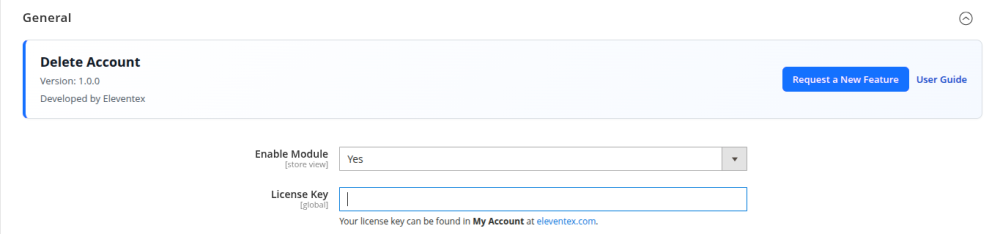
1. General Settings
- Set
Enable ModuletoYes. - Enter your
License Keyif required for your Eleventex installation.
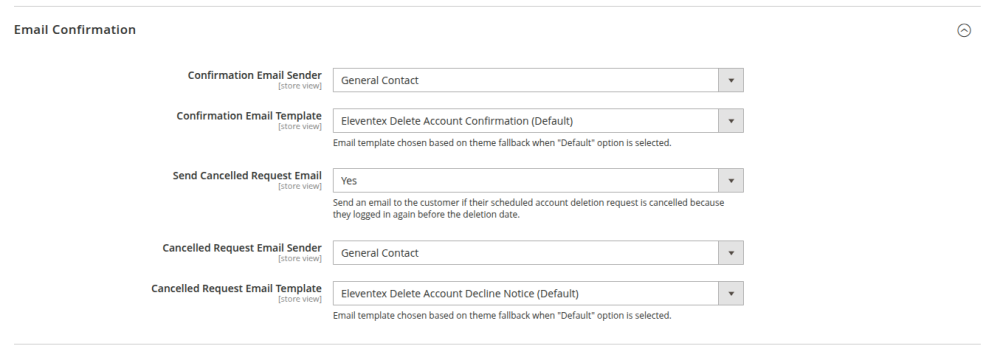
2. Email Confirmation Settings
These settings control the emails sent during the account deletion process.
Confirmation Email Sender: choose the sender identity for the confirmation email.Confirmation Email Template: choose the email template used for the confirmation message.Send Cancelled Request Email: enable this if customers should be notified when their scheduled deletion request is cancelled after logging in again.Cancelled Request Email Sender: choose the sender identity for the cancellation email.Cancelled Request Email Template: choose the email template for the cancellation notice.
3. Deletion Settings
Deletion Mode:Immediate: the account is deleted as soon as the customer confirms the request.Delayed: the account is deleted after the configured number of days.
Delete After (Days): set the delay period used in delayed mode.


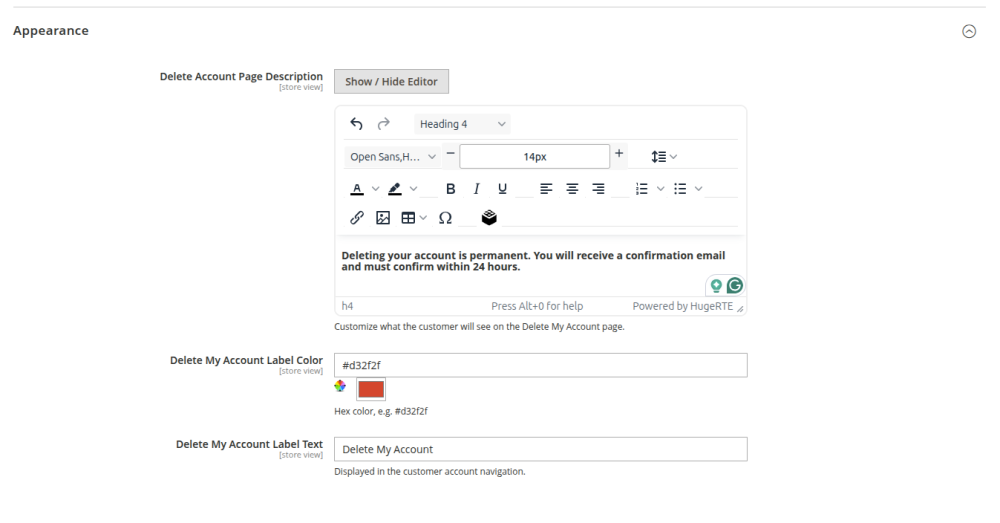
4. Appearance Settings
Delete Account Page Description: add the text shown on the customer delete-account page.Delete My Account Label Color: define the color used for the delete-account label or link.Delete My Account Label Text: define the text shown in the customer account navigation.
How Customers Use the Extension
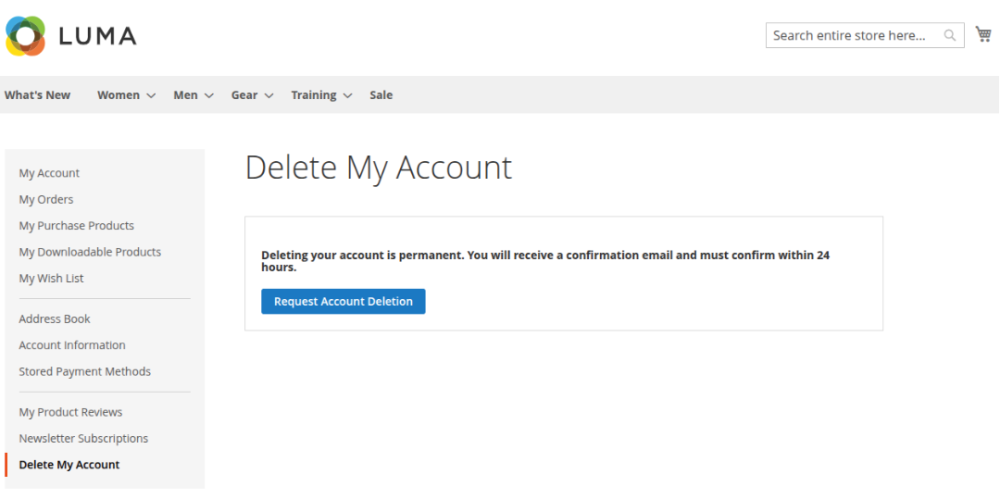
Step 1. Open the Delete Account Page
The customer logs in and opens the Delete My Account page in their account area.
Step 2. Submit the Request
The customer clicks the button to request account deletion.
Step 3. Confirm by Email
The extension sends a confirmation email to the customer. The customer must click the confirmation link within 24 hours.
Step 4. Deletion Is Scheduled or Processed
- If the store uses
Immediatemode, the account is deleted right after confirmation. - If the store uses
Delayedmode, the account is scheduled for deletion on the future date configured by the store.
Important Behavior
- Only confirmed requests are processed.
- Confirmation links expire after 24 hours.
- If a delayed deletion is scheduled and the customer logs in again before the scheduled date, the deletion request is cancelled automatically.
- If enabled in configuration, the customer receives an email when that scheduled request is cancelled.
Admin Monitoring
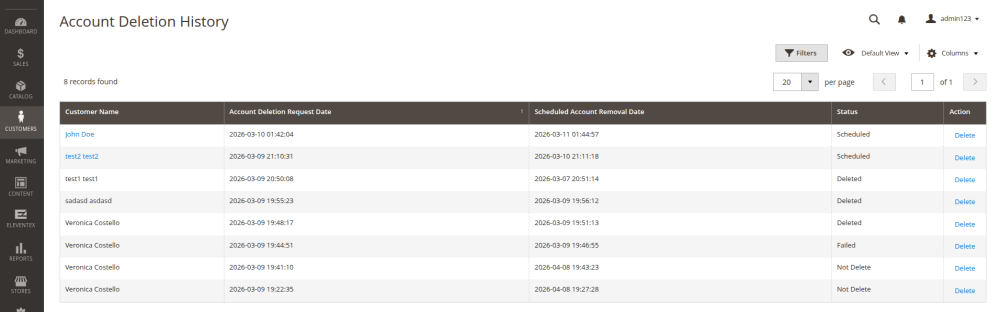
Administrators can review deletion activity in the admin history grid:
Eleventex > Delete Account History
This area helps track requests and their statuses.
Cron Requirement
For delayed deletions to work correctly, Magento cron must be running on the server.
The module uses cron to process deletion requests that have reached their scheduled execution time.
Recommended Setup
- Enable Magento cron before using delayed deletion mode.
- Test the confirmation email flow after configuration.
- Review your selected email templates and sender identities.
- Verify the delete-account page content so customers clearly understand the consequences.
Troubleshooting
Confirmation email not received
- Check that the module is enabled.
- Verify the configured sender identity and email template.
- Confirm that Magento email delivery works correctly in your environment.
Scheduled deletions are not being processed
- Make sure Magento cron is running.
- Confirm the extension is enabled.
- Check that the request was confirmed and has a scheduled deletion date.
Customer logged in and deletion disappeared
This is expected behavior for delayed deletions. Logging in again before the scheduled deletion date cancels the pending removal request.