This guide explains how to configure and use the Eleventex Catalog Search Status module for Magento 2.
The module adds a diagnostics widget to the Magento admin that helps administrators quickly verify the health of the configured search engine (OpenSearch or Elasticsearch).
1. What the Module Does
Magento relies on a search engine service such as OpenSearch or Elasticsearch to power:
-
Product search
-
Layered navigation
-
Catalog indexing
-
Product filtering
If the search service becomes unavailable or misconfigured, catalog functionality may stop working properly.
The Catalog Search Status module adds a small diagnostics widget directly to the Magento admin configuration page so administrators can immediately see the status of the search engine.
The widget shows:
-
Search engine connection status
-
Diagnostics summary
-
Cached service checks
-
Recent search service errors
This allows store administrators to quickly identify search configuration problems without needing to check server logs or run CLI commands.
2. Open Module Configuration
To configure the extension, go to:
Stores > Configuration > Eleventex > Catalog Search Status
This section contains the settings for enabling the module and configuring diagnostics caching.
3. Configure the Module
3.1 General Settings
Enable Module
Set this option to Yes to enable the Catalog Search Status widget in the Magento admin panel.
When enabled, the widget will appear in the Catalog Search configuration page.
Diagnostics Cache TTL
This setting defines how long the search diagnostics results are cached.
Because checking the search cluster can be an expensive operation, the module stores a cached snapshot of the diagnostics for a configurable period.
Choose a value that balances freshness of diagnostics and system performance.
4. Viewing Search Status
After enabling the module, open:
Catalog > Products
On this page you will see the Search Health Widget added by the module.
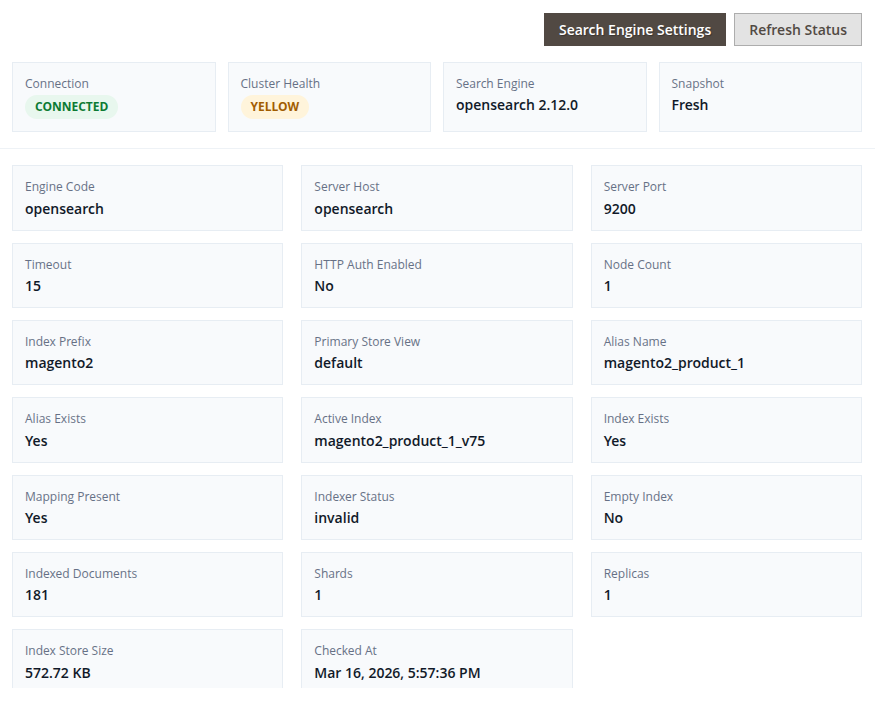
The widget displays a diagnostics summary of the configured search engine.
Information typically includes:
-
Search engine type
-
Connection status
-
Diagnostics information
-
Recent service error (if any)
This allows administrators to quickly verify whether the search service is reachable and working correctly.
5. Refreshing Diagnostics
The widget displays a cached diagnostics snapshot to prevent repeated requests to the search cluster.
If you want to check the current state of the search service, use the manual refresh option available in the widget.
Refreshing diagnostics will:
-
Perform a new search service check
-
Update the cached diagnostics snapshot
-
Display the latest connection status
6. Recent Service Errors
If the module detects an issue while performing diagnostics, the widget records the error.
The Recent service error field displays the latest failure detected during a diagnostics refresh.
This information can help identify problems such as:
-
Incorrect search engine configuration
-
Search service connection failures
-
Network issues between Magento and the search cluster
7. Supported Search Engines
The extension is designed primarily for environments using:
-
OpenSearch
It also supports:
-
Elasticsearch 8 (where available)
The diagnostics use the existing Magento search configuration values stored in the system configuration.
8. Troubleshooting
Widget Does Not Appear
Verify the following:
-
The module is enabled in
Stores > Configuration > Eleventex > Catalog Search Status -
Magento cache has been cleared
-
Admin configuration page has been reloaded
Search Engine Shows as Unavailable
Check the following:
-
Search engine host and port configuration
-
Magento search engine settings
-
OpenSearch or Elasticsearch service status
-
Network connectivity between Magento and the search service
You may also refresh the diagnostics manually to verify the current connection state.
9. Performance Notes
Search diagnostics can require communication with the search cluster.
To avoid unnecessary load, the module caches the diagnostics snapshot for the configured TTL period.
Administrators can still manually refresh diagnostics whenever a real-time check is required.