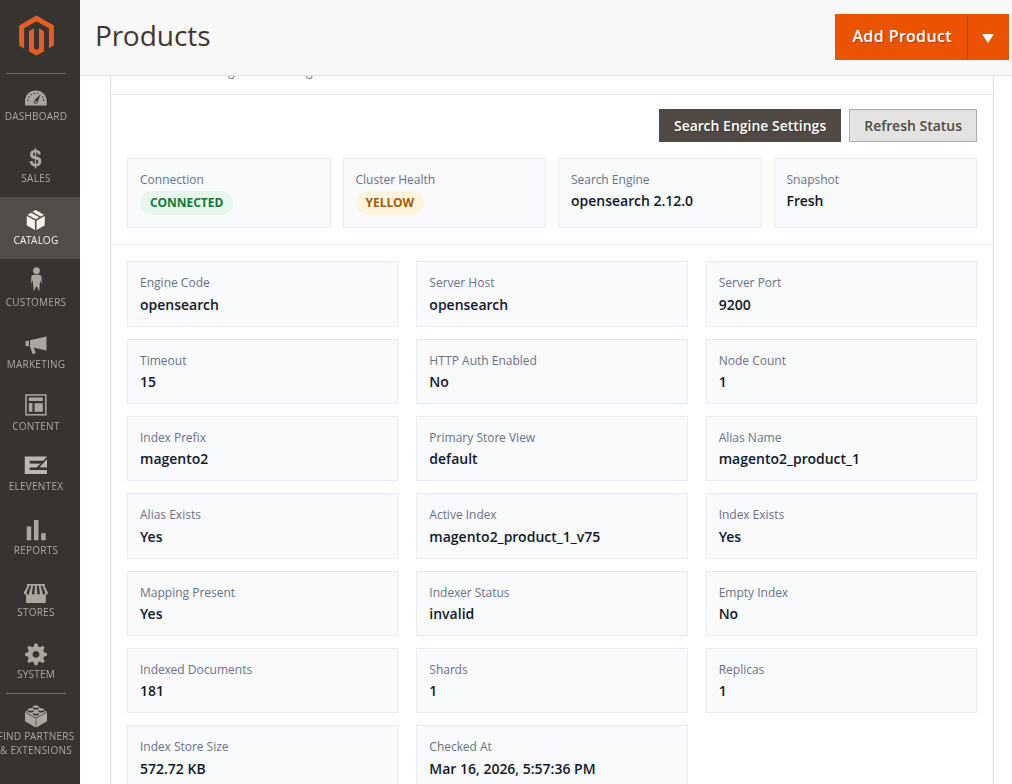
Catalog Search Status for Magento 2 by Eleventex adds a lightweight diagnostics widget to the Magento Admin that helps store administrators quickly verify the health of their search engine configuration.
Magento stores rely heavily on search services such as OpenSearch or Elasticsearch. If the search service becomes unavailable or misconfigured, product search, layered navigation, and catalog indexing can fail - often without a clear indication in the admin panel.
This extension solves that problem by displaying a compact search health widget directly inside the Catalog Search configuration page, allowing administrators to immediately see whether the search engine is working correctly.
Why This Extension Is Useful
When Magento search services experience issues, diagnosing the problem often requires checking logs or running CLI commands. This module brings key diagnostics directly into the Magento admin interface so administrators can quickly understand the state of the search service.
The widget shows connection status, diagnostic details, and recent errors in a clear summary. Expensive service checks are cached to avoid unnecessary load on the search cluster while still allowing administrators to manually refresh the diagnostics when needed.
Key Features
Search Engine Health Monitoring
View the current connection status and diagnostics summary of the configured search engine directly from the Magento admin configuration page.
OpenSearch and Elasticsearch Support
Designed primarily for OpenSearch environments, while also supporting Elasticsearch 8 where available.
Cached Diagnostics Checks
Search cluster checks are cached using a configurable TTL to avoid repeated expensive requests to the search service.
Manual Diagnostics Refresh
Administrators can manually refresh the diagnostics snapshot whenever they want to verify the current search service status.
Error Visibility
The widget shows the most recent search service error, making it easier to troubleshoot connection or configuration issues.
Simple Admin Configuration
The extension includes a dedicated configuration section where administrators can enable the module and configure cache TTL for diagnostics.